Take Control of Your Tech· Folge 2
The End of the Road for the 486
Dienstag, 3. November 2026 · 1 h 04
Kapitelklicken springt direkt hin
Shownotes
On this week's show, I answer a handful of audience questions from the Take Control launch, talk about the suggestions I've gotten so far, run down the Linux news since the end of Dual Boot Diaries, share a big list of things I've done to make my computing life better, answer listener questions, and more!
SUPPORT THE SHOW: Take Control of Your Tech is powered by you, the listener! Support the show and get an ad-free audio feed, access to the subscriber-exclusive Discord, and early access to the audio version of the episode (when possible). Go to takecontrol.content.town/subscribe to find out more!
Links Promised:
• Aftermath's We Must Kill Windows (aftermath.site/we-must-kill-windows)
• The Take Control Github Repo (github.com/notthatwillsmith/takecontrol)
• Fastmail Signup (join.fastmail.com/will)
• Epic is bringing EAC v2 (and Fortnite) to Linux (onlineservices.epicgames.com/news/introducing-…)
• Bazzite for Jailbroken PS5s (github.com/VivaLaVent/ps5-bazzite-deck)
• Linux Kernel 7.1 Drops Intel 486 Support (xda-developers.com/linux-71-is-here-and-it-kil…)
• KDE Plasma 6.8 Release Notes (kde.org/announcements/plasma/6/6.8.0)
• Gnome 51 Release Notes (release.gnome.org/51)
• Niri Compositor Settings for Noctalia v5 (docs.noctalia.dev/noctalia/compositor-settings…)
• REISUB keys page on the Arch Wiki (wiki.archlinux.org/title/Keyboard_shortcuts#Ke…))
This week's homework is to fix something about your computer that annoys you! If you have something that's annoying you, but don't know how to fix it, post in the Discord and we'll figure it out!
SPONSOR: This week's show is brought to you by Fastmail. Fastmail is email for people like you and me. For a free, no credit-card required 30-day trial, go to join.fastmail.com/willand sign up today!
• () - Cold Open
• () - Intro - Questions from Ep 1, Show Git, and More
• () - News - Epic Working on Linux-Compatible Easy Anti-Cheat for Fortnite
• () - News - Play PC Games on Your Jailbroken PS5 Using Bazzite
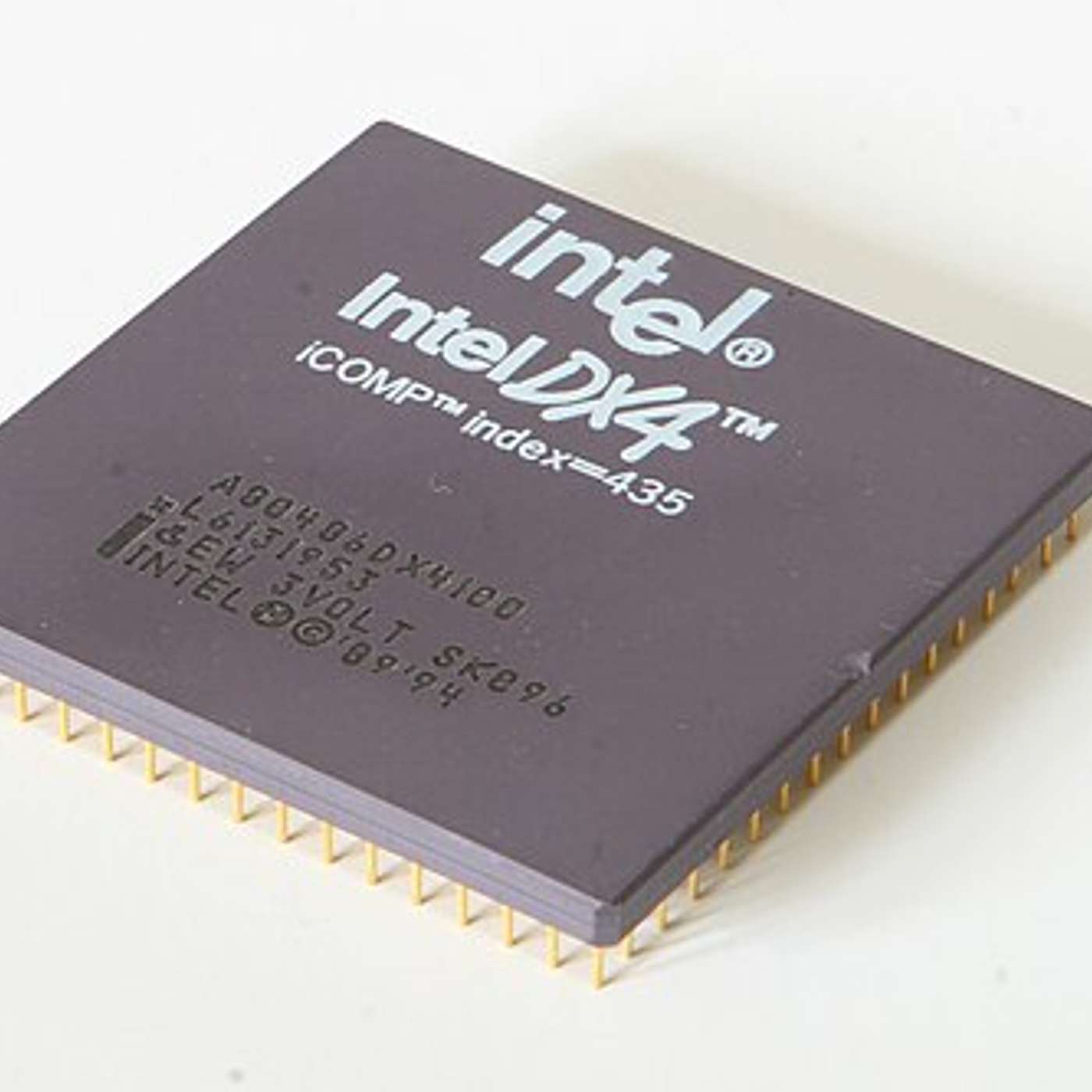
• () - News - The Linux Kernel No Longer Supports the Intel 486 Processor
• () - News - KDE Plasma 6.8 and Gnome 51 Released
• () - News - What News Do You Want to See Here?
• () - How Will Has De-Enshittified/Un-Shittified/Whatever We're Going to Call This
• () - Questions - Curtis on VR Support in Linux
• () - James - Figuring Out What You Need to Know and Don't Need to Know and Investigating Errors
• () - Question - John Has a Good Linux Starter Project
• () - Question - Jon on File Permissions and chmod 777
• () - Question - Nate and REISUB Keys
• () - Homework - Fix Something That Annoys You On Your Computer and Tell Me About It
• () - Outro
★ Support this podcast ★ (takecontrol.content.town/subscribe)
Transkriptvom Podcast bereitgestellt · Zeitmarken springen hin
[Will] Linux Fortnite. Bazzite running on jailbroken PS5s. The end of the road for 486. [Will] Me in Chris Person's awesome Aftermath article talking about switching to Linux. [Will] And a big long list of steps I've taken to take control of my tech. [Will] Welcome. Hello. My name is Will. I'm the host. And we are here today to talk about taking your computers back from the man, getting control of your technology, making your computers work for you again.
[Will] That's where we're starting. I had a good question on I think it was a comment on the blog this week. [Will] And somebody said, hey, I listened to that. I love the message that's in your blog post talking about why you would want to do this. You can find it at takecontrol.content.town. [Will] But I was hoping it was going to be more how do I unbreak things Google and how do I get these things out of my life.
[Will] And that first episode was a lot of Linux stuff, which I replied. Look, the way to think about this is it's a variety show. [Will] We're going to do some. We're going to talk about Linux some. We're going to talk about making Windows good. [Will] We're going to talk about how to get rid of services and those big giant tech companies Google that are harvesting your information.
[Will] We're going to talk about consumer electronics. We're going to talk about how to get your TVs clean. [Will] It's funny. I never had this problem because I haven't upgraded my TV in 15 years at this point. [Will] I'm still rocking the 1080p and it feels a little smart now, but also the picture is not as good as it could be, I guess.
[Will] The other stuff we're talking about is Internet of Things stuff, which we haven't. [Will] I don'think I touched on last week, but I'm looking at little microprocessors the ESP32 and all of the let'see home assistant adjacent work that's happening with stuff music assistant and the open home project and all of these things to.
[Will] Move off of hosted services that are spying on us constantly in favor of things that you run locally and you can run in the home lab or you can run on more privacy oriented services and stuff that. [Will] Think about it as a variety show. We're probably not going to have something for everyone on every episode, but we do have content chapter markers in the podcast.
[Will] You can always just skip over if you get something you don't care about. Just skip to the next chapter. It's fine. You're not going to hurt my feelings. I'm fine with that. [Will] First off, some housekeeping stuff. I was stoked because a few months ago, Chris person a few weeks ago, I guess. [Will] Chris person over an aftermath who's also been on the Linux switch train for the last little bit last six months or a year asked me how it was going and asked me for some quotes and asked.
[Will] We talked about a little bit about what I thought about this whole process and what we know how what I learned doing dual boot diaries and what I learned making the switch from daily windows to daily Linux. [Will] I'm quoted in there. It's on aftermath dot site. The headline is we must kill windows, which, not wrong, but also a little bit.
[Will] It's a little it's got a little bit of a late 90s micro dollar sign soft vibe, which I. [Will] You should check it out. I'll put a link in the show notes as well. [Will] Another thing that came out of the discord. If you're not in the discord, you can join the discord by joining the community and supporting the site.
[Will] You go to take control dot content dot town slash subscribe where for six bucks a month to get access to the full thing. [Will] Everything we got. You get the ad free episodes. You get access to the discord. You get my undying gratitude. [Will] That's on the list of things you get. , hey, thank you all who signed up. I appreciate each and every one of you.
[Will] But somebody in the discord suggested setting up a git repo for show notes and things that I talk about on the show, which I thought was a fabulous idea. [Will] I did that. It's open to everybody. You can go to get hub dot com slash not that Will Smith slash take control again. [Will] There'll be a link in the show notes. There'll be a link in the show notes to the GitHub repo, which will also be stored in the GitHub repo and linked in the show.
[Will] It's because I'm exporting markdown files and just posting my full unedited or maybe lightly edited to remove personal stuff. [Will] Show notes up there you can find that. [Will] I've also uploaded things my cachey, my neary config for my neary setup because people have asked about that. [Will] If there'scripts or things that we talk about, I'll make sure we put them in there as well.
[Will] And if you have ideas for things you want to add in, look, it's not a wiki. I have a long history with wikis. [Will] But if you want to do a pull request, grab the repo, make your edits, submit them. I'll look at it. I'll merge them in if they seem good. [Will] I'm down for that's it. [Will] The thing, the big thing I want to leave with here on the talk about the show bit, because I won'talk about I won't belabor it.
[Will] But this is I want feedback. I want you guys to tell me what you want. I want you guys to tell me what you want. [Will] We're going to do news here in a minute. I want to know what news you want me to talk about here. [Will] You want me to talk about? Let'see. Are we five minutes in yet? Can I say the word.
[Will] Do we want to talk about uninsuredification? Do we want to talk about Linux stuff. [Will] What do you want out of each section? Please let me know. [Will] Pop up question, pop a comment in the discord if you're in there or leave a comment on the podcast on take control content. [Will] Town or you can send an email to take control at content.
[Will] Town and I will look at all three of those places and collate the feedback. [Will] I may not do everything, but I've had a lot of great ideas from folks already and I really appreciate the notes and the comments and the questions and the whole thing. [Will] It's been really wonderful. The response that people have had to this has been really good.
[Will] We had I had the first episode more people listen to than listen to a normal tech pod episode in the first week. [Will] That's amazing to me. And I'm super stoked and I really appreciate everybody'support. [Will] On that note, let'see, I think let's take a quick little break now that we're a few minutes in.
[Will] We're going to talk about advertisers again. If you want to skip the ads, you can go to take control.content.town and get an ad free feed for the podcast. [Will] It is exclusive to you. But now we're going to take a word from our sponsors and we'll be back with the news. [Will] And now the news. Hey, guys, did you hear that Epic is making Linux compatible.
[Will] Fortnite anti cheat. Now, folks who play games and have paid attention this for a long time know that Epic has had epic owns easy anti cheat. [Will] EAC is what you often see it called on games. It'll install a little thing for games that use it and a little tool. [Will] And there's a bunch of different versions. There's been some let'see.
[Will] There's been compatible versions for Linux native clients games for 10, 15 years at this point. [Will] Almost they also added support for Proton in 2021 or 2022 that some other games use. [Will] But those Linux versions are not as secure as the Windows versions because in Linux we have the freedom to do whatever we want.
[Will] We can go in, we can change the kernel, we can write new kernel modules that intercept commands between software and the system. [Will] There's all sorts of ways you can add cheating. That's why we haven't had Fortnite. [Will] There's two probably two reasons we haven't had Fortnite on Linux. [Will] One is that Tim Epic and Gabe Valve are fussing about video games and platforms and all that stuff and have been for years.
[Will] They probably don't want to support the Steam Deck, which is one of the bigger, more popular ways to play games on Linux. [Will] But the real reason I think is probably that the security stuff is hard and cheating in any big multiplayer game. [Will] But especially one as big as Fortnite is an ongoing problem and something that it's pushing down bubbles in wallpaper.
[Will] You fix one exploit and somebody else adds a new one. [Will] There's these big giant companies that are collecting that are doing cheats as a subscription service now. [Will] You can subscribe to get easy to install cheats that are working at a really low level. [Will] And, in some cases even include hardware devices that you plug into a PCI Express slot and then will snoop on the connections between RAM and your applications to rewrite stuff in RAM and things that.
[Will] It's a gnarly set of problems. I don't have any fault against Epic for not doing this. [Will] But they announced alongside the announcement of their vibe coded version of the Epic game store front end, which we're not going to talk about that today, but it's a mess. [Will] They announced that they're doing an EAC and a V2 for Linux, which is the TLDR is that they're writing there's a bunch of different ways they can do this.
[Will] One is that they could write a janky kernel module that would plug into everybody's kernels and would snoop and see when people were trying to write to protected game RAM and or read from protected game RAM, I guess, too. [Will] And then, crash the game when that happens. And people have tried stuff that before. It's not great.
[Will] That's . I haven't used any of that. Just full disclosure. [Will] The TLDR is that they seem they're working within the existing Linux ecosystem. [Will] They're using the features that Linux provides that lets them lock down the machine in such a way that it'safe. [Will] And they're also doing in a way that this will probably if you want to if you want to play Fortnite on Linux or use an EAC to game on Linux, you'll probably be able to just make a new boot entry on your boot menu that boots into the requirements for that.
[Will] And then have your normal one for doing day to day work. You still have to reboot to change that. [Will] But it's a one step closer. And maybe you'll be able to find some people might be able to work within the constraints of their requirements. [Will] Is this I'm not an expert on this stuff. I'm not a deep level kernel hacker, but I do understand enough to know what they're talking about here.
[Will] And this feels a pretty good both for them and for the community and for the people who play games on Linux solution to these problems. [Will] We run down the list of requirements because it's a pretty big one. First off, you need a signed kernel, including signed kernel modules for things the Nvidia drivers.
[Will] Now, I think that probably also means that if you have other kernel modules installed, I have one for my Wi-Fi and Bluetooth card, I think you'll have to either disable that or they'll have to be signed as well by people that they view as using well-known keys is the defining. [Will] Anytime they talk about science stuff, they're talking about people using well-known keys, because of course, on Linux, you can run on Windows for that matter.
[Will] You can download something, you can sign it yourself and then it'signed. But that doesn'tell you anything about the validity and the what's the word, the origin of that file. [Will] If you're using well-known keys, then if it's an Nvidia signature, then that Nvidia signed that module. [Will] If it's a Microsoft signature, Microsoft signed that module and on and forth. If it's your distro provider, the distro provider signed it and the list of well-known keys are from places canonical and fedora universal blue, which is I think includes Bizzite and Silver Lake and Silverlight silver blue.
[Will] Blue, Debbie in open Susie, Rocky, Microsoft, all Malinux colors. I didn't see cash or Arch in there, which was interesting because Arch is obviously what's running on the Steam Deck. [Will] Cash is one of the more popular non gaming only the more popular general purpose distros for gamers. [Will] I think Cashew did come out and say afterwards that they were going to build a custom kernel that works with this.
[Will] You need a sign kernel that's relatively easy to do. You need a TPM 2.0 and secure boot both need to be turned on and using well-known keys. [Will] TPM is the hardware encryption module that's built into every CPU and on motherboards and stuff that's been around for 10 years at this point. [Will] This is the requirement that a lot of people had trouble with if they had I think Intel 8th Gen or older Windows 10 machines that prevented them from moving to Windows 11 easily.
[Will] If you have a machine that's newer than 2017 2018, you have this. [Will] You need measured boot running measured boot is the thing that tracks what loads on boot on your Linux machine and it makes a chain of custody for everything that happens during the boot process. [Will] UEFI handed off to the bootloader handed off this the to the kernel did this and loaded these modules.
[Will] And then here we are and there's no break in that chain. [Will] You also on that note you also need to turn off K exec, which is the thing that lets you change kernels without rebooting. [Will] That means if you do an update on this machine running this kernel you won't be able to you'll get to the end of that update process and it'll say hey I gotta you gotta reboot.
[Will] You can't just switch kernels when you're running natively because that breaks that measured boot chain. [Will] I O M U. [Will] This is the input output memory management unit which controls access between DMA direct memory access capable hardware and your system RAM. [Will] This is a thing. [Will] This says hey we're not going to let a PCI Express card write directly to RAM without us knowing about it and that prevents those cheater cards from accessing and changing protected system RAM or protective game RAM rather.
[Will] And then the last thing is the Linux security module BPF which I wrote that down and then I forgot to write down what that means. [Will] I will dig that out here momentarily or we might just say it'some Linux nerd business. [Will] Oh here we go Linux compatible BPF. [Will] This is the this allows programs to use granular access to control and monitoring.
[Will] Anti cheat this lets the anti cheat their anti cheat software restrict other processes from reading or writing protected game memory without needing to do a kernel module. [Will] They're using the stuff that's already built into Linux to bypass the need to write something that goes in the kernel or gets injected into the kernel.
[Will] This stuff will only run when the game's running. [Will] They're using system D to turn it on when it's needed and turn it off when it's not needed in the same way that happens on Windows machines when you boot an EAC game. [Will] The kernel plug in will still be there on the Windows machine but it's not running when the game's not running which is as it should be.
[Will] This is why your games that have anti cheat often take a long time to boot compared to a traditional non anti cheat game. [Will] Anyway the TLDR for people who are want to play Fortinit on Linux is that probably assuming your distro supports the does the work support this or you do the work to support this because this is all stuff that you can turn on and off yourself using kernel flags and enabling secure boot and making sure you have your stuff signed appropriately and all that.
[Will] Is that you'll probably have you'll probably add a boot entry to your system in grub or refine whatever boot manager use that says hey this is the Linux Fortnight kernel and that's you'll boot over to that when you want to play for it. [Will] I played a lot of Fortnite over the years. I stopped when they added the Harry Potter and Kardashian stuff because it was bad for my mental health to get teabagged by a Kardashian after I'd been killed.
[Will] I'm probably good but I'm stoked that they're doing this. I think this is a real vote of confidence in favor of Linux as a gaming platform which I think is great. [Will] This also opens the door for things Call of Duty and Call of Duty obviously I don'think this is a easy anti cheat. Battlefield doesn't use easy anti cheat but there are a bazillion games use anti easy anti cheat and I think this is good for the overall health of games.
[Will] I think having access to these technologies even though they're closed is probably good for gaming on Linux. [Will] Now they had a fact at the end of this. I'll link the blog post in the show notes but they had a fact at the end of this and my favorite one is hey this is what about the Steam Deck.
[Will] The answer is the Steam Deck does not support the required features for our EAC2 v2 solution but we're actively talking with Valve and hope to support in the future. [Will] There you go. They didn't mention the steam machine in the frame which is I think also telling because I think the steam machine probably will do most of this stuff out of the gate.
[Will] What the situation is with Arch because they don't mention Arch and they don't mention Cache in the list of well-known keys. [Will] That's the other big question. That's epic making Linux compatible for now. Let me know if you're going to play Fortnite on your Linux machines. [Will] I'm curious what people think. More gaming news. This is a short one but Bizzite.
[Will] There's a jailbreak for current PS5s including the pro running. I think it's firmware 13.60 and older from 7 to 13.60. [Will] You can download a thing run it on your PS5. It lets you run third party software including Linux and the Bizzite folks have gotten Bizzite running on jailbroken PS5s. [Will] That has full access to the GPU and you can play games on you can load up steam. You can play your steam games on the steam interface with Linux on a PS5.
[Will] I haven't done it yet. I usually don't jailbreak consoles that I'm using especially given the cost of replacing the console if the jailbreak ends up getting you blacklisted jailbreaking your console may get you blacklisted. [Will] I think you're probably safe. This is a soft mod as I understand it'soft mod. Rebooting resets it should be no problem.
[Will] But I thought that was pretty cool being able to play PC games from steam on your PS5 feels magic. Good job. The jailbreakers I guess. [Will] 46 support. This is a we're now we're into this the Linux news that I wanted to talk about while were on the hiatus after Dubu Diaries ended before the show started up.
[Will] But 46 support is being removed in Linux kernel 7.1. That's it. That's the whole story. The Linux kernels prior to 7.1 still had 486 support. [Will] That's maybe the other way to this is a this is very much a weekend update Saturday live story. I was shocked to find out the 46 support was still in the Linux kernel.
[Will] But here we are. The 46 for folks who don't know is a CPU that came out when I was in college 35 years ago. Maybe even before that I think it came out I was still in high school. [Will] Early 90s late 80s type times and probably good. We're probably fine. We're going to be . Hold on. Don't get don't panic. Everything's gonna be fine. We don't have to get upset about this one.
[Will] It's that the 46 is gone. Never forget. Katie and this is another legacy story from the break. But Katie and gnome both released major new versions. [Will] Katie plasma six point eight came out middle of October. Time to go with the 30th anniversary of Katie and the short run on the feature list. They have a big long list of full changes which I'll link in the show notes.
[Will] But the short version is that they did a bunch of accessibility stuff including some mouse hover stuff. They did better window styling for non native apps including steam. [Will] They've updated this union news this new union theming scheme which lets you unifies all of their theming in one place. It's a new take on it. And my favorite part about that is that they made a union version of their default breeze theme that looks exactly the non union version of the breeze theme.
[Will] You can download it. You can try it out. Let them know where it's different which I think is fun. And then the last thing is that they're not going to support X 11 starting X 11 sessions in plasma anymore which is feels the end of an Arab X 11 is 40 plus years old and has been replaced by Wayland for most enthusiast desktop users.
[Will] But this feels the end of an era for Linux on the desktop honestly. For folks who don't know from the non Linux people Katie and genome are the two desktop the two most popular I think desktop environments. [Will] Dome is a little bit more Mac key. Katie is a little more Windows II. They handle the stuff the Windows Chrome. They handle things the start menu and your file browser and the image preview app and the calendar and all the stuff that ships out of the box.
[Will] Your terminal your package managers all that stuff your graphical package managers and they provide all that software. Changing from Katie to genome or vice versa lets you change the way your Linux install looks and works without necessarily changing the software underpinning it or all of the software underpinning it at least.
[Will] Gdome 51 released in September and they did a bunch of perp improvements for displays especially when the systems under heavy load include improving frame times on animations and stuff that. They remove support for the legacy closed source and video drivers in favor of the newer ones that everybody else is using which is good.
[Will] They've added offline map support and new public transport transit info. This is another good example of the things that you get with a DM genome provides a lot of the things you find on a Mac or an iPhone even. [Will] They have a maps app they have an image viewing app they have a document viewing app stuff that. They updated the files app in a big way. I get this as a near user I was really stoked about it's quite good.
[Will] And then the updated file preview app is fantastic. This works the one in Mac OS does where you hit space bar in the file browser and just pops up a little window that gives you the a quick glance into the image or PDF or whatever it is that you're looking at. [Will] Both of these are out. I put links to the full show notes in the docs you can check them out.
[Will] And then the last thing is I really want to know what Linux news or what news in general you want in this segment. I wrote Linux news for some reason but I'm curious what you guys are looking forward. You want more anti-intrification stuff. [Will] You want more about the things the TVs recording us that Steve over at Gamers Nexus posted over the last couple of weeks. What stuff are you looking for here. Please let me know the email address is take control at content that town or you can leave a comment on the podcast or join the.
[Will] Discord and you can post up in there what you're looking for and the segment will change. I'm the part of the joy and fun of doing a new show is figuring out exactly what it is. [Will] I'm thrilled to get feedback especially this early stage and please let me know what you think. Again take control at content dot down or just post in the suggestions channel in the discord.
[Will] We had a bunch of questions last week about why all the Linux stuff. For folks who don't know this is a continuation. This podcast is me picking up where we left off with dual boot diary. We're going to have some Linux changeover stuff. [Will] How long we're going to do it. Exactly how I'm going to keep doing as long as it makes sense. I think it is as long as people are into it. But I had some questions because we had some people coming in that didn't know about the dual boot diary.
[Will] I talked last week about nearie and switching over to noctalia v5 nearie folks who don't know is a desktop manager. Is that . I always get this mixed up but it's the thing that draws the windows on the screen and it does everything on a big long it's called a tiling window manager. [Will] Instead of having windows you can move around the desktop and stack on top of each other. They all just end up in a row and you can use keyboard shortcuts or mouse shortcuts to switch between them really quickly. It's really a convenient way to browse a desktop.
[Will] Nearie for folks who don't know is spelled N I R I and noctalia is N O C T A L I And they work together noctalia does the stuff that Gnome and KD do on the on other Linux desktops where they provide the launcher and on all the little applets that you use to change Wi Fi settings and brightness and stuff that.
[Will] That's that. Somebody asked for a quick rundown on what I've done to dis and shitify or D and shitify. We need a better. What's the opposite of in shitification. Is it on shitification. Is it de shitification. Is it help me out. Send me a note post a comment please let me know what you think. [Will] Here's what I've done far. They asked for a list of things I've done far. I think the Linux one is the big one. That was the big leap. That's I realize it's not for everyone. But then I also did a lot of I did a lot of stuff disable a lot of stuff in windows that sucks. I uninstalled co-pilot entirely. We'll do it. We'll talk about that. Maybe the quick and easy stuff you can do in windows to strip out all the problems. We'll talk about that next week I think.
[Will] But the stuff turning off the web search in your start menu disabling co-pilot isn't in as many places as you can turning off Windows backup and all those prompts and setting up a bag turning off backups not enough. The windows backup for folks who don't know uses your one drive space to back up your local computer which is fine if you're on a laptop with one hundred and twenty eight gig or five hundred twelve gig ssd. You get a bunch of one drive space you copy that over if you're on a desktop PC with a bunch of space. You're a computer.
[Will] Getting hard drives or even a couple of two terabyte SSDs. [Will] It's just not. It's a financially unwise decision to back up your entire computer to one drive. [Will] And, the Microsoft doesn't recognize that the SIR. [Will] The service and the sales pitch don't recognize that. You keep getting these.
[Will] Hey man, it'd be a real shame if something bad happened to your computer. [Will] We're going to suggest you should back it up with windows backup. [Will] It's the one best way to back up your windows computer. And then you don't ever have to worry about anything. [Will] Also it's going to be $80 a month for you to save all those files on. I hope that's cool.
[Will] We're just going to charge the card you have on file cause you also. [Will] You got office and Xbox live. We already know how to get your money. And , it's real. [Will] It'd be a real shame if something bad happened to your data. One drive sucks. , sorry, one drive does suck. [Will] But backup windows backup sucks. Co-pilot sucks.
[Will] There's a bunch of little features in windows that are just profoundly. [Will] Unfriendly to anyone, but especially to power users. [Will] To people who know what they're doing. We'll talk about that. I switched my Google, I switched search from my. [Will] My default search is now Kagi instead of Google. , Kagi is a paid service.
[Will] I pay them I think 10 bucks a month. I get a whole bunch of access to search. Their search is. [Will] I'm going to say much more robust than the modern, Google search. At this point, they. [Will] They do a really good job of highlighting things that are made by. [Will] People that are current and relevant. It doesn'the. The history doesn't go back as far as Google.
[Will] If you're searching for something that came out in the 2000s or even in. [Will] The 2010s, Kagi may not be great for that, but it's become. [Will] I found that it's definitely good enough to use as my default. It doesn't. Unlike DuckDuckGo and things that. [Will] Which are, is another free alternative to Google.
[Will] DuckDuckGo lives on top of the Google index, sorry, the Bing index. [Will] You're using Microsoft search engine instead of Google. [Will] Which feels you're walking out of the frying pan into the fire. [Will] Whatever metaphor you want for that. , Kagi has been good. [Will] I switched to fast mail shout outs to fast mail. Thanks for sponsoring the podcast.
[Will] But, I do my email and calendar there. [Will] I did end up adding a Google account to that address and we'll talk about that. [Will] As well. But we can talk about that here. This is a good place for that. [Will] If you have a non Gmail hosted email address. You can sign up for a Google account that's.
[Will] Free that gives you access to things docs. But doesn't give you access to email or calendar. [Will] I'll put a link to that in the show notes cause. [Will] The microphone's on my Google speaker, it turns out. , but. [Will] I'll put a link to that in the show notes cause it was hard to find. [Will] They don't make it easier for you to sign up for a service that on a non.
[Will] Gmail account that doesn't charge money. [Will] Then what they want to do is sign you up for Google accounts for your domain. [Will] Which if you're paying for fast mail and using fast mail. [Will] You really don't need cause you already have email and you already have. Calendaring through them. , that the.
[Will] If you don't do that, the downside is that when you. [Will] When somebody sends you a Google docs link to your email address and it's. [Will] You need to sign into your Google account to see this thing. You have to sign in on a temporary way. They. [Will] They do the thing where you try to sign in and it says, Hey.
[Will] You don't have a Gmail account. You don't have a Google. [Will] Google account associated with this address. We need you. [Will] We're going to send an email address with a number in it. [Will] And then you type that number in and that gives you access until the next time. [Will] You restart your computer, close the browser. And then you'll have to do that again. It's a pain in the butt.
[Will] I found this to be an compromise. They're not able to see my email. They're unable to see my calendar. [Will] But I can , since I do use this for work. It's important to be able to access the shared files and stuff that. [Will] That's a, that was a big one . , on the phone. The phone, one of the first things I did.
[Will] I wrote an article about this 15 years ago on tested, that's been lost to. Time. But the. [Will] The basic strategy on the phone is to turn off everything I don't use. [Will] Get rid of all that crappy apps that you've installed. Turn off all the notifications for everything, but text. [Will] Maybe discord if user for DM, stuff signal your calendar.
[Will] Your reminders app, your tasks app, stuff that. , and turn off it. [Will] Be really ruthless here. You can turn stuff back on. I, they're. [Will] They're, it's funny. I have two tiers of notifications. I have the things that I always want to see. [Will] And then I have the things that I want to see when I need them.
[Will] And then I also have a couple on because you occasionally get a good. Deal. There's a sandwich shop. [Will] That a guy runs a bagel place down the street from my house. And he does. [Will] He does special when he has at the end of the day. [Will] If he has more salmon, then he's going to be able to sell before it goes bad.
[Will] Then he'll do a deal on locks bagels where they're half off. [Will] And I keep his notifications. He gets the notification. He gets to send me notifications still. , but the. [Will] The gate is really does this stuff , does this make me feel good. [Will] I don't want notifications. They're going to be bummers. I turned off all the notifications for the news apps.
[Will] I turned off all the notifications for, e-commerce stuff. [Will] I don't need to know that Amazon has sent me a package. [Will] It's going to get here when it gets here. I get, they send me. [Will] They used to send me notifications, emails, text messages, all this stuff. [Will] I turned all that crap off. All the Facebook and Instagram and meta stuff.
[Will] I turned off for the handful of things that I still have to use for work. [Will] I got rid of almost all my meta stuff. I don't use meta anymore. Meta that I feel is a scourge. [Will] But that's a topic for probably a whole episode. [Will] I looked at subscriptions. The subscriptions I'm paying for and the subscriptions I not I'm using and not.
[Will] And, I shifted by my wife and I shifted a bunch of stuff streaming. [Will] Services from things that we just pay for all the time to things that we only. [Will] Flip on when we're watching something. Peacock gets money for me while the WNBA season is going and the. [Will] Traders is on. And then the rest of the time it gets turned off. Sorry, Peacock.
[Will] I think that's the big stuff. Oh moving accounts off of Google's OAuth. This is a big one. [Will] One of the hardest parts of moving off of the Google account onto the. [Will] Pass mail was the old passwords, the old. The million services that I signed up for in the 20 years. [Will] 25 years almost that I use that email address as my main email and how to. To move all that stuff off.
[Will] My process for that is gradual and slow as a lot of this is. But every time I sign into an. [Will] Every time I'm prompted for a sign in and uses my old Gmail account. I log in, I go to the account page. [Will] I changed the email address to a new mask email on face on fast mail. And then I, then that's it for that.
[Will] I do the confirmation stuff that I have to do. It's for a while it was a bunch of week. Now I'm at this point. [Will] A year and I'm seeing maybe one a month. Maybe two a month that I saw it signed into and it's . I'm not. [Will] I'm not turning that email address off. This is. This is the other thing is these moves don't have to be.
[Will] These don't have to be big, sudden, life. Or this isn't life or death. This is a. [Will] We're going to make some gradual changes over a long period of time. [Will] And at the end of a year, you're going to notice a difference. [Will] The end of two years are going to notice a big difference, but you can't.
[Will] You can't cold Turkey this stuff. It just doesn't work that way. [Will] It's too ingrained. , we've been using it for too long. They got their hooks in us and we have to. [Will] We have to wean ourselves slowly. [Will] And then there's a bunch of other small stuff and we'll talk about some of this.
[Will] A little bit using glance app and. [Will] And fresh RSS instead of Google news has been incredibly good because I'm not. [Will] Seeing a bunch of weird AI generated crap in there anymore. I'm not seeing. [Will] Links from threads that when I click on my PC. [Will] It just kills the browser and opens up something that's a non usable webpage. A glance app is a news.
[Will] It's a homepage replacement for your browser. You run it in a. [Will] It runs in a Docker container and you tell it what stuff you. [Will] You tell it what YouTube channels and Twitch channels you. [Will] You tell it what topics you want to know about. You tell it. [Will] You can give it RSS feeds or what I do is I run all my RSS feeds through fresh.
[Will] RSS and then export that list of feeds into a feed that. That the glance app shows. It's quite good. , but. [Will] But the main thing is this isn'the reason I doing a. [Will] I think doing a podcast about this is a good idea is that it isn't. [Will] It isn't something you can do. It's not an instantaneous change.
[Will] It took us a long time to get in this situation where we're all our. [Will] Our digital lives are all entangled with these services and these bad companies. And, now we can disentangle. [Will] It's going to take a while to disentangle though. , that's it. That's. [Will] That's the, that's where, that's my big list of things I've changed over.
[Will] If there'stuff you want to know more about, please let me know. I'm probably going to for the next few weeks. [Will] I'm going to start going down this list and we're going to do this segment. [Will] We'll be about one or two of these things a week, the. [Will] How can you D and shitifier on shitifier also for the love of God.
[Will] Please help me come up with a word for that. , and on that note. [Will] Let's take a quick break and then we'll do some questions. [Will] Questions. If you have a question for take control of your tech. [Will] You can send it to take control at content.town. Again. [Will] That's take control at content.town. If you want to do an audio question.
[Will] The easiest thing to do is to pick up your phone, turn the voice recorder on. [Will] Hold the phone up to your mouth this and talk into it for about a. [Will] Minute and then, put that M four a file that it's going to give you or the. MP3 file. [Will] I think if you're on Android and just send it to that email address with maybe a.
[Will] Little description of how you want to be introduced and. And what the topic is. [Will] And I will pull a handful of them for each episode at some point. [Will] I think we'll probably do a whole episode of questions. [Will] I'm getting a lot more than I can do on a weekly basis. But. [Will] The first question comes in from Curtis and it's about VR.
[Will] That's a great question, Curtis. , on the frame. [Will] Which I've tested most recently, it's a little spotty. , they're doing. [Will] It's funny cause the steam patch notes now are every single one. [Will] Is , Hey, we made the wireless dongle for the framework better. [Will] We're working on streaming. It's getting better. Stuff's improving, blah. Blah. And it is.
[Will] It is getting significantly better every time I've tested it. [Will] For the traditional wired headsets, I've had quite good luck. [Will] I haven't used a meta headset, on Linux cause I don't have a. [Will] Current, my most recent meta headset is the Oculus, quest one. [Will] I think. It's old and not particularly relevant anymore. But.
[Will] But when I plugged in an index earlier, late last year, early, no. [Will] Earlier this year, to play some, racing games. I found it was quite robust. [Will] I had a trouble getting the controllers working. The pedals and the wheel and all that stuff working. [Will] But the headset worked great for the games. Most of the games I tested.
[Will] The exceptions were things Forza Horizon. I think I had a problem with. [Will] And then, but the indie smaller stuff I hadn't just. [Will] Just worked out of the box on proton, which was quite nice. , the. [Will] The one note is that wireless streaming dongle that valve ships. [Will] To go with the VR headset is the support for that spotty on Linux.
[Will] At least, it's getting an update every single week, every. Every time there's a steam update, it says, Hey. [Will] Better support for the wireless stream steam streaming dongle. [Will] Every time I've tried it's not been great on Linux. I typically. [Will] At least from streaming heavier weight games from the PC to the frame.
[Will] I'm typically booting into windows to do that, for. For the time being at least, I'll. [Will] My prescription inserts are finally coming for the frame. [Will] I'm going to spend some more time with it in this next week, I hope. [Will] And I will update if things have changed, cause I haven't used.
[Will] I'm probably the last time I tried it was probably three major steam. [Will] Updates ago, two major steam updates ago. There you go. Thanks. [Will] Thanks for sending the question, Curtis. , the next one is from James. It's about. [Will] We need to know what you versus what you don't need to know.
[Will] Thanks, James. [Will] A lot of that stuff you're fine not knowing. You don't need to know what VAR slash opt is now. [Will] There'some places that are, it's useful to know that slash dev is. [Will] Gives you access to every piece of hardware on your computer. That's a. [Will] That's a really convenient place to find that out. It's nice to know that, you.
[Will] Know, you can mount your stuff in slash mount? But you don't have to. [Will] You can really mount it anywhere. , I find, let'see. When you'really starting out. [Will] Just work in the GUI, it's to just work in the GUI. You'll. [Will] You'll start picking up the knowledge about where stuff lives and where it makes.
[Will] Sense. And why stuff is sometimes stored saved in slash user slash lib. [Will] And why sometimes it's in slash user slash share slash lib and stuff that. [Will] I even don't understand a lot of that stuff at this point. [Will] But the TLDR is that it really doesn't matter. [Will] The thing that I've found that's really useful is I have a big notion database.
[Will] That's just full of the things that I've learned. . There's. Hey. [Will] Where are the shortcuts that your launcher uses to launch applications. [Will] That's in a dot in your home directories dot config dot slash. [Will] I can't remember. It's, this is why I wrote it down. But the point is. [Will] Most of the time you don't need to know the underpinnings of Linux.
[Will] Especially if you're running on an immutable system BSI or something. That, or it'silver blue or one of those. [Will] One of those that one of those distros where the only things where the main. [Will] Everything but your home folder changes every time you do a big update. I, the second part of your question.
[Will] I think is the important one. Investigating errors is the really interesting part of this question, I think. [Will] There's a couple of things here. One is that it's useful to learn how to use journal control. That's G J O U R. [Will] N A L C T L. And that gives you access to your system logs from the terminal and you.
[Will] Can even go back to previous boots. You can put dash in a number and it'll go. [Will] The number one takes you one boot back. The number three takes you three boots back. [Will] If you had a crash or something that made the system unusable. Then you can get to that information easily. [Will] You can see where the problem was. The other thing is that most system applications.
[Will] Most desktop applications will launch. If you launch them from the terminal, they'll put the standard output. [Will] The debug code, the debug messages in the terminal window. [Will] If you launch them from the launcher, that stuff just goes away. It goes into your logs. You don't see it. [Will] But if you're having trouble launching something and you want to see what's.
[Will] Going on during the launch, why it's hanging, why it's not. Why it'showing a black screen or whatever. [Will] You can launch that stuff and you get really useful error messages that you can. Then Google. , for. [Will] I think you mentioned specifically downloading a script from GitHub on. Those. It's often that you have to.
[Will] You have to work with the people who make those scripts directly because. [Will] Either they're low traffic or they're not documented particularly well or. [Will] Something that. And you're going to have a conversation. [Will] Post an issue post in there in their message board on their get. [Will] If they have a discord connected, check that out and. Chat with them there about what's going on.
[Will] Cause often on that stuff. It's you're missing a dependency and the script doesn't error. [Will] Throw the appropriate error when the dependency doesn't, isn'there. [Will] And you're not going to, you're not going to find that out normally. But journal control for big system stuff. [Will] Launching the application that won't work in the terminal. And then what you do with those messages.
[Will] Usually I Google them first or I run them through Kagi. [Will] I find that Google is a little bit better at Linux error messages. Depending on the age of your system. If. [Will] If it's a piece of software that's been around for 20 years. [Will] Google is going to be a disaster because it's going to show you error. Message form posts from 2018.
[Will] If it'something that's relatively new, then Google's great. Kagi is pretty good. The other one. [Will] And this is a little more controversial. But this is one of the places that the. [Will] That the LLMs do a pretty good job is with Linux troubleshooting stuff. [Will] You can also paste in your error message into Google.
[Will] Tell it what you're into Gemini rather, tell it what you were trying to do. [Will] And you'll get a pretty, it may not be. It probably won't give you the answer. [Will] But it'll give you a jumping off point that will let you. They can give you an idea of what's going wrong. [Will] That's it. And then the last piece is that. There's a perception in the Linux community that people who.
[Will] The people who ask for help with Linux have a bad time. They get yelled at. [Will] Or people are upset with them or whatever. [Will] And while that has definitely been the case in the past, in my experience. [Will] The modern incarnation of Linux desktop users, it's. It'such a new thing that normal people can do that.
[Will] A lot of the older people who were grumpy about helping out noobs and told them. [Will] To read the fucking manual and stuff that 20 years ago. Probably aren't doing this anymore. [Will] And the people who are helping folks now have been incredibly. [Will] Incredibly friendly, the community we built up around dual boot diaries.
[Will] The folks in the discord here, the folks in the tech pod discord. [Will] And even in the more general, I pop in occasionally when I have a problem. [Will] With noctalia or neary, I'll pop into the appropriate discords. [Will] And people are helpful and friendly. It's funny, somebody. I mentioned last week that I was having trouble.
[Will] Where with transparency and noctalia where I was having. [Will] Things that were supposed to be semi-transparent were blurring in a weird. Way. I went into the doc, the. [Will] The noctalia discord, I posted my problem. [Will] Somebody was , Oh. You probably need to look at your compositor settings in neary cause you.
[Will] Probably have V four settings for compositors and those have changed a little. [Will] Bit. And if you go to this page on the noctalia docs page. [Will] It'll tell you what it'll look for those settings and then see if they're. [Will] If they're or if they're using your old settings. And sure enough.
[Will] They're using my old settings. I've changed them. The blurred corners went away. [Will] The weird blur on the widget backgrounds went away and. [Will] I had a lovely interaction with somebody in the noctalia community. [Will] Don't be afraid to ask for help. People are friendlier than you might.
[Will] Think. Our next one's from John from Rally. [Will] I think. [Will] Often people ask what's the best way to get started doing Linux stuff. [Will] And I think this is a great one, pick a project. [Will] Something that's not mission critical that you don't need for work or for. [Will] School or whatever it is that you do on the day to day and.
[Will] And set it up in a way that you can futz around with it. [Will] And a main cabinet is fabulous for that. Back up the thing you have. [Will] The main implementations on Linux are relatively straightforward and easy to use. [Will] But , I think that's a, I think that's a great place to start. [Will] What I would do, what I would do to get started with something that is find.
[Will] The community of folks who are doing it and dig into their documentation. [Will] Look at their configs and stuff that they've set up and go from there. [Will] And then the big questions are you going to run what's your. [Will] What's your main, are you going to run one of the front ends. It does everything for you.
[Will] Are you going to put it all in a folder and do it old school and set up the front. [Will] End yourself for a main cabinet. [Will] I am looking at my mister over in the corner that I don't play with as much as I. Should. And. [Will] My recommendation there these days is to pick the games that you want to play and. Put a handful of them on.
[Will] Don't put the entire run of all 15,000 roms or whatever are in main these days. [Will] Pick up, pick a subset and then build yourself a. [Will] A cut list of your favorite arcade games and play them with maim would. [Will] Be my advice. I think that's a great, picking a project that. [Will] Those are great way to start was to dig into Linux at the beginning.
[Will] Let'see. Our next one is John Bob Carr. [Will] Thanks John. Thanks for singing as well, John. [Will] The shmod 777 is some classic Linux business. [Will] I think my headphones went out. They just turned off. [Will] Everything's cool. You're not supposed to shmod 777 everything. That's a bad idea for a whole host of reasons.
[Will] But the main one is that it lets any process running on your machine access. [Will] Those files. Now, sometimes that's. If you're just talking about your media files, it's. [Will] It's not the end of the world if they get wiped out because you'll just. [Will] You're going to re rip your blue rays and put them back there.
[Will] The real answer though is no, I put everything in my home folder. [Will] I'm a generally pretty well behaved person on my desktop. [Will] The servers are a different situation because you said, you. You hinted at the problem, especially if you have. [Will] I have a NAS one machine that holds all my media.
[Will] And then I have a server on another machine that accesses that and runs it. [Will] Through Plex. Now I just set that back up. We talked about a little bit last week. I. [Will] This is the first time I've ever understood Linux permissions well enough to do. That the way. [Will] And I have my NFS shares set up that they're passing permissions.
[Will] We're using the same users on it's the same user ID on all the machines. [Will] That stuff just inherits through some mechanism that I don't fully understand. [Will] But works. What that means is you want, let'see. Inside the Docker container on the host machine and on the. [Will] NAS, you want the user that has. That needs read access to those files to all have the same user ID.
[Will] When you look at their user number. That doesn't mean the user name. [Will] It means the number of their, the number in the user table. And you can. [Will] There's a bunch of ways you can do that. [Will] The main one is that you set them up the same on the two machines and then you. [Will] Tell the Docker container to assign the Plex user that the appropriate number.
[Will] In the container, in the Docker compose. Or whatever you're using to run Plex. And that works quite well. [Will] It turns out using NFS for Plex meant that you had to do this. [Will] Cause it didn't work otherwise. That was quite nice. The other, on the. On the desktop side. [Will] If you store all your work in your home folder and you don't access that work.
[Will] With pseudo in the terminal or running a root application. [Will] Your permissions will just be . , if you're, let'see, I think it's. [Will] Is it seven five I think is what you usually run in your. In your home folder. , I think it'seven five. I'm. [Will] I'm bad at this. I always had, this is one of the things. This is one of the things that everybody's , Oh.
[Will] You totally understand how the permissions are. No, man. I always have to look up what the. [Will] What the number is to set the permissions the way they should be for when. [Will] I needed to change a permission on something. And the nice thing is about Linux is I don't. [Will] You don't have to do it all that often unless you're doing stuff.
[Will] The thing with the Plex server running on multiple machines. [Will] Running across multiple machines. As a normal user. I don't worry about it too much. , on the home lab stuff. [Will] It's more of a pain in the butt. [Will] The downside of doing it wrong. I guess in the world where people are constantly attacking your Plex port.
[Will] Trying to break in, and especially if you don't update your Plex server often. [Will] Enough, it's a, probably a mistake to shmod. As you said, 777, everything. [Will] But that does is gives everything access on the computer to writing and. [Will] Reading those files. Anyway, I would love to know what.
[Will] If people I'm sure are going to yell at me for this one, but this is, for me. [Will] This is just to use the computer and don't worry about it too much situation. [Will] We got one more question from Nate. I love this question. I'm going to run it. This is just gratuitous for me. [Will] Because it makes me feel good.
[Will] This REI re sub keys. We got a lot of questions about. [Will] And I thought it was on to boot diaries and I thought it was really fun. [Will] I've never had to use one of these. , I've. I've never had a problem on my machine. [Will] I've had problems with the crash. My machine to the point that it just rebooted and I couldn't get back into.
[Will] Anything. I've never had a problem with my machine. I've had problems with the crash. [Will] My machine to the point that it just rebooted and I couldn't get back into. Anything. [Will] But I never had anything that hung in a way that it prevented me from. [Will] Hitting control alt Four and switching to a terminal and rebooting that way.
[Will] That's the. The short version of the answer is that usually I've been able to. [Will] If you're in a desktop environment, you're. You're in a graphical user interface. [Will] You can also always hit control alt and then one of the F keys. [Will] Not F one or F two or sometimes F three, depending on the disro.
[Will] But Four, Five, F six through F nine, I guess, or F 10. You can. [Will] You can switch off the graphical user interface and log into just a terminal. A terminal login. [Will] And then you can sign in there and usually type a reboot or shut down and you. [Will] Might have to pseudo it and it'll turn off or reboot your computer.
[Will] Even if something's pretty badly broken with the GUI. [Will] Now the resub stuff is more. The idea is here's a panic key press, not. [Will] Not panic in the sense that you, the user panicking. But a thing that bypasses at a really low level. [Will] The kernel's always watching for these and if it sees it's.
[Will] Oh, I got to turn everything off and reboot and damn the torpedoes. We're just going to do it. [Will] You generally have to turn these on in the OS. They're not turned on by default is my understanding. [Will] At least most is this is a district. This is one of those things that the distros choose arch and cache.
[Will] You don'turn them on by default. You need to set a kernel flag that turns on the options you want. [Will] There'several options. , I'll link the arch, wiki, which has a good. A good breakdown of these, for the. [Will] That's applicable to all distros how they're implemented might be different.
[Will] Based on your distro of choice. But, for example. You can send a SIG term to all processes. [Will] Which lets you shut off processes gracefully. That. [Will] That is the, Hey, please turn off. Think of that one as a, Hey. Please turn off. And, that is. [Will] That works unless you have a prompt that pops up when it's , Hey.
[Will] Do you want to save your work man? Then that's going to fail. [Will] You can send a SIG kill, which terminates processes immediately. [Will] Anything that's not hung, that'll shut it down. You can flush all the data to disc with another one. [Will] That one's convenient if you're especially on a server that does a lot.
[Will] Of stuff in memory and you want to write those database changes that are. [Will] Lingering in memory, but not on the hard drives yet. You can unmount and remount file systems read only. [Will] That's good if you think you have some a, malware problem. Something that. [Will] Or if something's running out of control and eating all the disc space.
[Will] And the way you do this is you, these are typically you hold alt. [Will] And then you hit the system request or system RQ. What that is. Is that, what the system RQ is short for 20. [Will] I've seen this for years. It's usually the print screen key on most keyboards. [Will] But you hold that down, hit print screen, and then hit the. Hit the command that you want on top of that. I'm.
[Will] I almost did it on my computer, which would be bad. I the alt system request F which. [Will] If you have one process that it uses some heuristics to pick a non. [Will] Vital process that's using the most memory and then kills it. [Will] If you have something that has a memory leak and it's eating all your system.
[Will] Memory, it's making everything slow. You can do that. It's all system request F, which is quite good. [Will] And then you can run these through a terminal too. If you're talking about a remote server or something that. [Will] It's a fun topic. It hasn't come up for me. , , that's. That's the system request thing. And Nate.
[Will] I'm glad that DuBois Diaries helped to get a new job. That's amazing. I love that much. , and congratulations. [Will] On that note, I think that's, probably, let'see. [Will] We'll take one more quick break and then we're going to bring homework. [Will] Back. We're going to make homework fun. I promise it's going to be good.
[Will] Homework. You're going to enjoy this. I'll be back. We, I said it, we're bringing homework back. [Will] This week's homework is to fix. Homework, hold on, let me. Let me take a step back. , on DuBois Diaries. [Will] We did homework for Adam and me. Which was a project or task that we wanted to figure out and.
[Will] And do in the intervening weeks, in the intervening. [Will] The week between recording one podcast and recording the next podcast. [Will] And we wanted to do that task that we had something interesting to talk. About that we'd both tried. [Will] And I want to do that with the show between you guys and me.
[Will] This week's homework is an easy one. We're going to start with something simple. [Will] I want you to fix something about your computer that annoys you. [Will] It could be something that you already know how to fix and just haven't. Bothered with. [Will] I have a million tiny things that make me quietly crazy all the time.
[Will] One of them now is that my audio setup is a nightmare. [Will] Because I'm using Jack and also a bunch of different interfaces on Linux. [Will] But then also I have this windows installed that I use a couple of times a week. [Will] And I've never done any of the un-initiated de-shinification. [Will] Un-initiated de-shinification. Anyway, I've never made it. I think my homework for this week is going to be to.
[Will] To get rid of all the crap about windows that I don't. We'll talk about it on next week's episode. [Will] But I want you to find something about your computer that annoys you and I want. [Will] You to fix it can be something small. It can be turning off Bing results in the start menu. It can be.
[Will] Getting rid of non-essential notifications on your phone. One of the things I love the newer versions of iOS. [Will] If you just swipe left on a notification. You have the option of sending that notification. [Will] There's a little gear that pops up and then you can send that notification into.
[Will] The, into a hole where, or it's not a gear anymore. [Will] It says options now on the new version, but you can send it, you can. [Will] You can options that and then you can mute it for today. [Will] You can mute it for an hour or you can turn it off forever. [Will] It's a really easy way to just, as you're getting annoyed.
[Will] Get rid of those notifications. , do that, do something. [Will] Get rid of something that annoys you kill copilot, turn off a windows backup. [Will] Prompts. , let'see some comments. Let'see some discord posts. [Will] Let'see some emails telling me the things you did. , I want to. [Will] Especially if you're in the discord, I want to see some. Some conversations about the things you did.
[Will] Cause this is one of those places that we can all help each other. [Will] And one person figuring something out that they. [Will] That annoyed them that they fixed can turn into 20 or a hundred or a thousand. [Will] People, getting rid of something that annoys them. Let's get some actionable improvement in our lives.
[Will] And that's our homework for this week. And on that note. [Will] It's the end of the episode. , thanks everybody for listening. [Will] Thanks for sticking with it this long. I appreciate you. [Will] I'm sorry about the audio problems on last week's episode. [Will] I hope they're better this week, but if they're not, please let me know. I'm.
[Will] I'm, I've not edited a video podcast myself before and I'm learning resolve at. The same time. I'm a. [Will] Definitely a dilettante in the resolve side and mastering audio and resolve is. [Will] Challenging. I know when I've used resolve in the past. I've mastered the audio in a different tool and, it's.
[Will] It's a whole new world out there for this. Let me know what you think. [Will] The email address again is take control at content.town. [Will] If you would to support the show, I would really appreciate it. [Will] I'm doing this. We get a little bit of money from fast mail, but mostly it's. [Will] It's listener support that funds take control of your tech.
[Will] You can go to take control.content.town slash subscribe where for $6 a month. You get access to the discord. [Will] You get access to the ad free podcast feed and, we. We chat in there a lot. [Will] We're in there all the time talking about Linux stuff and we're talking about. De-initiation. [Will] I might make a whole channel to talk about what the word for this is because.
[Will] I realized this is a problem and we'll have to. We'll have to get through it in the coming weeks. But, again. [Will] The URL is take control.content.town slash subscribe. I appreciate it. We've set this up that. [Will] There's no big giant companies aside from Stripe taking money from this. I'm paying a, hosting rate, that's.
[Will] That's more or less flat based on the number of users we have. [Will] There's no Patreon in here taking a big percentage of the revenue. [Will] The money goes to me and supports me and my family and the show. [Will] And I appreciate everybody who does that. Thanks. Thanks everybody for supporting the show far.
[Will] There's a blog post that I posted last week about a little deeper dive. [Will] Into what the mission for the show is, what's going on. What I want to add. We have the GitHub that's up now. [Will] You can check that out with your member or not. , if you can't subscribe. [Will] I get it. Times are really hard now. , go leave a review on Apple. On Apple podcasts. That helps more than.
[Will] I love to see reviews and I love getting positive reviews and getting a lot. [Will] Of people downloading the podcast will help us get promoted by Apple. [Will] Which is good for the show. , that's it for me. [Will] Thanks everybody for listening. Thanks to fast mail for supporting the show. [Will] Go to join.fastmail.com slash will you get a free 30 day trial and.
[Will] They throw a little bit of cheddar cheese my way. I appreciate everybody who's tried out fast mail. [Will] Let me know what you think and we'll see you all next week on take control of. Your tech. Bye everybody. [Will] Hey, let's go Valks. Woo. WBA champions. 2026. Woo. Valkyries. Bye everybody.